
➡️ Overview
If you’d like to cancel your proxy subscription or ask about a possible refund, this guide will walk you through the available options. Whether you’re testing our service, changing your setup, or running into issues, we’re here to help.
Tip: If you’re canceling because of connection or performance issues, we recommend contacting support first. Many problems can be solved quickly with configuration help or proxy replacements.
✔ Create a support ticket or email support@rayobyte.com
➡️ Cancellation Options
You can cancel your proxy service in two main ways, depending on where your subscription is managed.
✔ Option 1: Cancel in the IPv4 Proxy Dashboard
This applies to most current IPv4 Static Proxy services, including Dedicated, Semi-Dedicated, ISP, Semi-ISP, and Port-based Rotating Proxy plans.
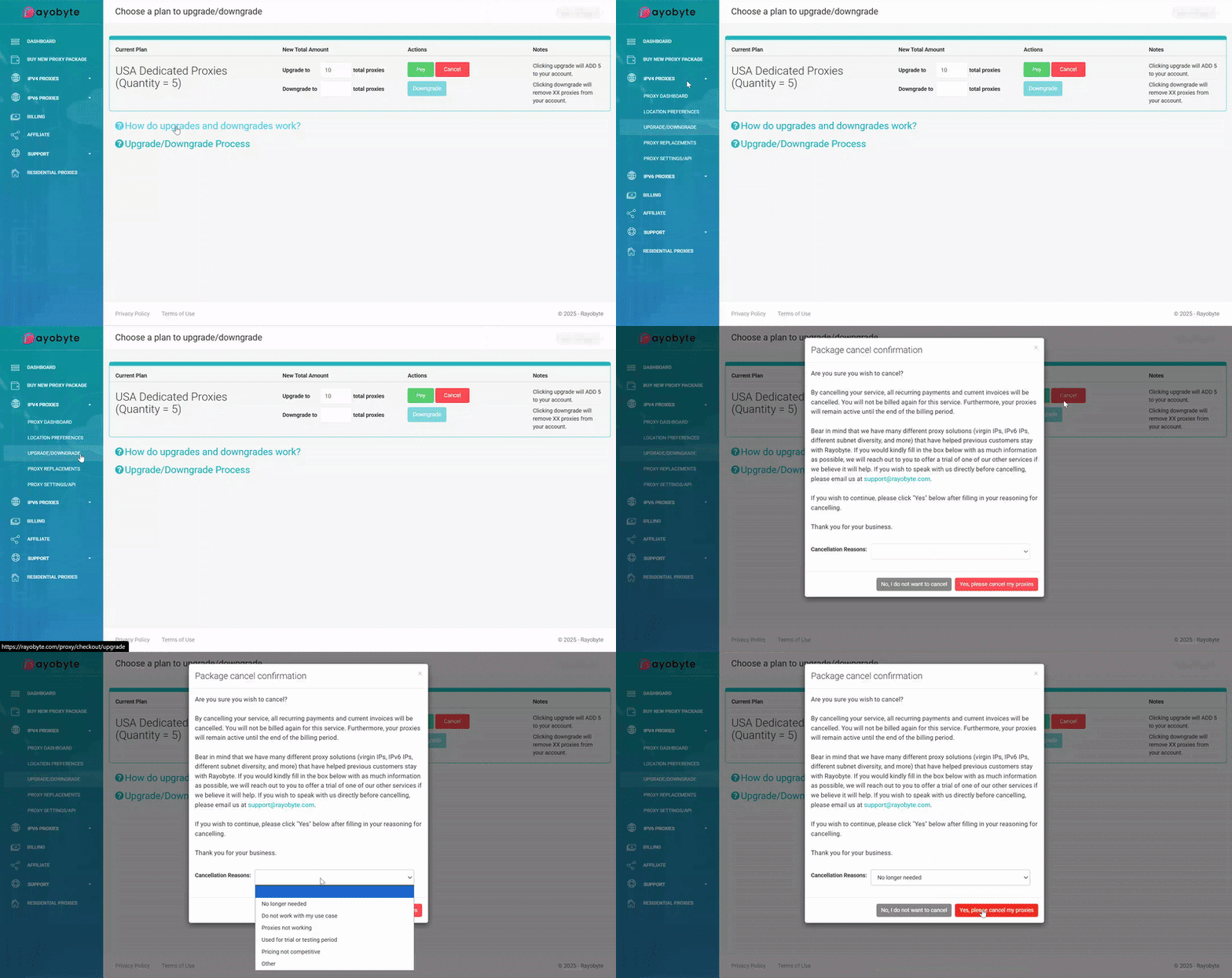
- Log in to your IPv4 Proxy Dashboard.
- In the IPv4 Proxies section, click Upgrade/Downgrade.
- Choose the Cancel option for the service you want to cancel.
- When prompted, enter a brief reason for canceling and confirm.
Your service will normally remain active until the end of the current billing period, and future renewals for that service will be stopped.
✔ Option 2: Cancel in the Client Area
You can also cancel your proxy services through our legacy WHMCS billing area:
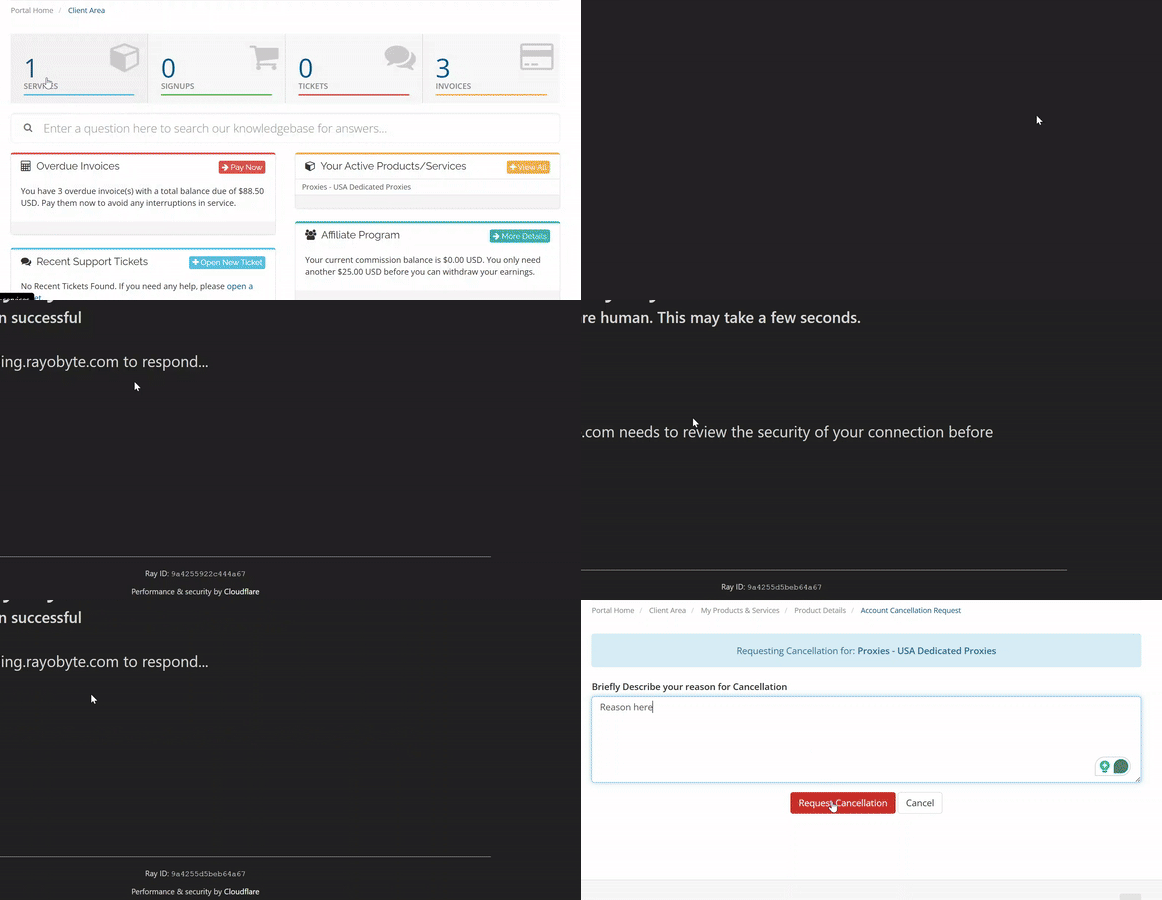
- Log in to the Client Area.
- Go to the Services section.
- Select the proxy product you want to cancel.
- Click Request Cancellation.
- Provide a reason and confirm the request.
Once requested, the service will be queued for cancellation at the end of the current billing cycle.
➡️ Refund Policy Overview
Rayobyte’s refunds are governed by our Refund Policy, Terms of Service, and Acceptable Use Policy. In general:
- Refunds are not guaranteed for lack of use, a change of needs, or general dissatisfaction.
- Requests are reviewed on a case-by-case basis and must comply with our policies.
- Abuse, policy violations, or chargebacks may make an account ineligible for refunds.
You’re always welcome to contact us if you feel a refund might apply to your situation — our team will gladly review it for you.
➡️ Trial Refunds (2-Day Risk-Free Trial)
For certain Data Center and ISP proxy packages, we offer a 2-day trial (typically limited to one package of 5 proxies per customer).
If the proxies do not work for your intended use during this period:
- ✔ Contact support@rayobyte.com or open a ticket within 2 days of purchase.
- ✔ Let us know that you’d like to request a trial refund and include your order details and use case.
After the 2-day window, the service renews on its regular schedule unless you cancel it. Refunds outside the trial window are not automatic and will be reviewed according to our policy.
➡️ Multi-Month Plans
If you purchased a multi-month plan (for example, 3-month, 6-month, or 12-month billing):
- Refunds for unused time are not automatically granted.
- You may still request a refund, and our team will review it in line with our refund policy.
In many cases, we can help optimize or adjust your plan (e.g., by changing locations, replacing proxies, or advising on configuration) so you can still use the service effectively.
➡️ How to Request a Refund
If you would like to request a refund, please reach out, and we’ll review your case.
✔ Steps to Submit a Refund Request
- Create a ticket at https://portal.rayobyte.com/en/support/tickets/new or email us at support@rayobyte.com.
- Include the following details:
- Your account email.
- The product or package you’d like a refund for.
- The purchase date and any invoice/transaction IDs you have.
- A short explanation of why you’re requesting a refund.
Important: Submitting a request does not guarantee a refund. Our team will verify whether your request qualifies based on our refund policy and will let you know the outcome.
➡️ Not Sure If You Should Cancel?
If your proxy service isn’t working as expected, we’d love the chance to fix it before you cancel. In many cases, we can:
- ✔ Replace non-working or blocked IPs (where replacements are available).
- ✔ Help adjust locations, subnets, or proxy types to better fit your use case.
- ✔ Review your configuration and provide best-practice recommendations.
Often, a quick adjustment can save you time and keep you from needing a new provider.
✔ Open a ticket and tell us what you’re trying to do — we’re happy to help.
➡️ Need Help?
- ✔ Email us at support@rayobyte.com if you have questions about your subscription, billing, cancellations, or refunds
- ✔ Support Portal: Create a Support Ticket