
➡️ Overview
Over time, some proxies that previously worked well may become less effective due to website changes, new blocks, or shifting targeting needs. When this happens, Rayobyte allows you to replace individual proxies directly from your dashboard.
This guide applies to all of Rayobyte’s Static IPv4 Proxy Services, including:
- ✔ Dedicated Proxies
- ✔ Semi-Dedicated Proxies
- ✔ ISP Proxies
- ✔ Semi-ISP Proxies
Note: Residential and other rotating proxy services use a different system and do not support this replacement flow from the dashboard.
Before replacing a proxy, we recommend first checking basic connectivity and configuration issues (authorization type, IP allowlisting, port, protocol, and target site rules). If everything looks correct and a proxy still isn’t suitable for your use case, you can proceed with a replacement using the steps below.
➡️ How to Replace Static Proxies in the Dashboard
- Log in to your Proxy Dashboard
Go to: https://rayobyte.com/proxy/dashboard/ and sign in to your account. - Open the Proxy Replacements Page
In the left-hand menu:- Click IPv4 Proxies to expand the submenu.
- Select Proxy Replacements.
- Choose Your Replacement Method
You’ll see two ways to replace proxies:- Option 1 – Replace Proxies Individually
This is best if you only want to swap out a small number of proxies.- Scroll through your proxy list.
- Click the Replace button next to any proxy you want to change.
Option 2 – Replace Multiple Proxies at Once
Use this when you already know which IPs you wish to replace and prefer to do it in bulk.- Locate the bulk replacement text box.
- Manually enter the IPs you want to replace (one per line).
- Click Submit to process the replacements.
- Option 1 – Replace Proxies Individually
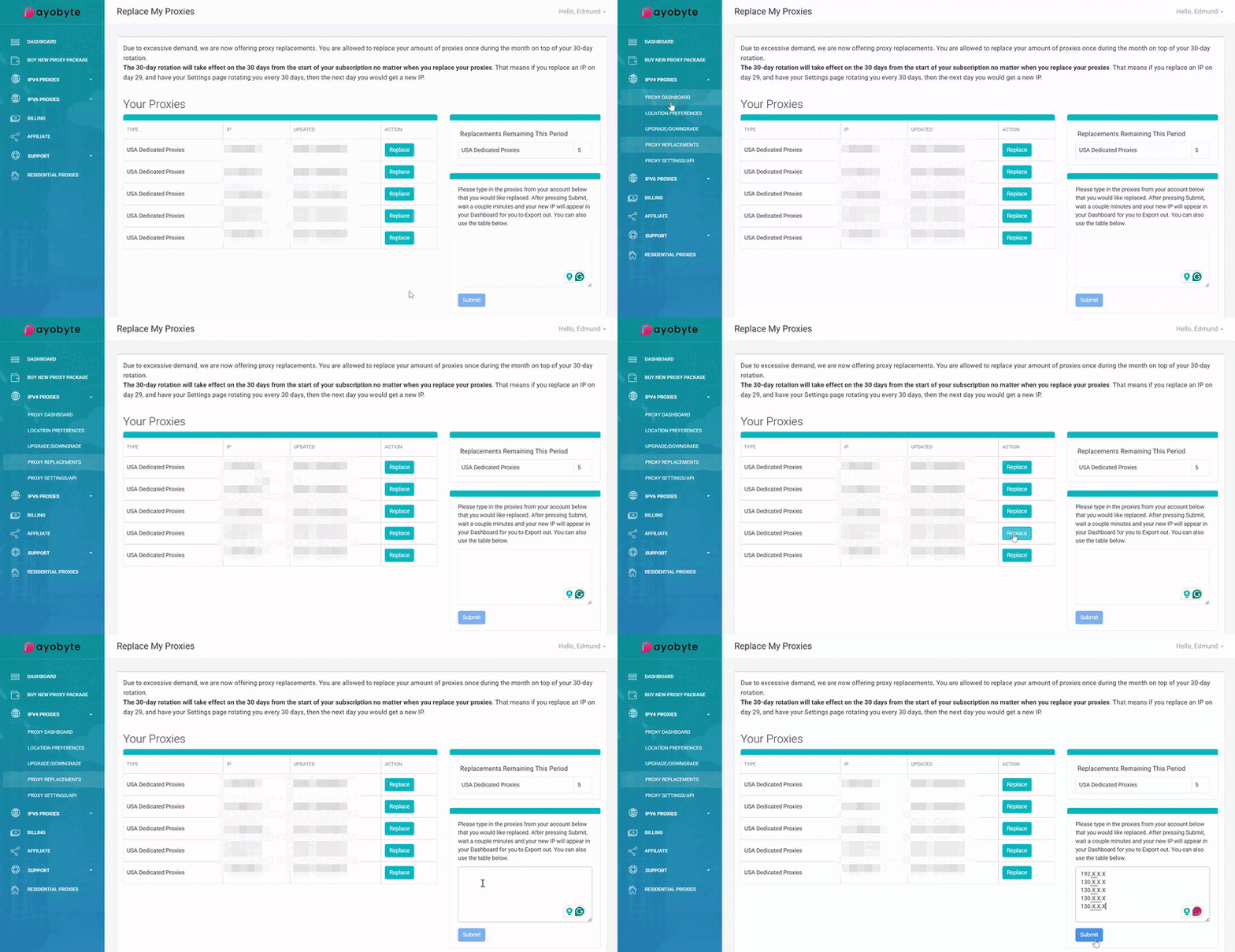
After you submit your replacement request, our system will assign new IPs to your account. Please allow up to 10 minutes for the latest proxies to be fully delivered and ready to use.
➡️ Replacement Credits
Proxy replacements are provided as a complimentary benefit with your static proxy plan. When you purchase proxies, you’ll receive a matching number of replacement credits.
- ✔ For example, if you buy 5 USA Dedicated Proxies, you receive 5 replacement credits.
- ✔ Each time you replace a proxy, 1 replacement credit is consumed.
- ✔ Once a replacement is processed, the system assigns a new IP in place of the old one.
If you’ve used up all your replacement credits but urgently need more replacements, you can purchase additional credits at 50% of your monthly renewal price. Please contact our support team if you’d like to add more replacement capacity to your account.
➡️ When Should I Consider Replacing a Proxy?
Common situations where a replacement may help include:
- ✔ A proxy consistently fails or times out on a specific website, even after troubleshooting.
- ✔ The IP appears to be blocked or heavily rate-limited for your use case.
- ✔ You’ve changed targets or verticals and need fresh IPs to test.
If many proxies are failing for the same site, it may indicate site-level restrictions, configuration issues, or a need for a different proxy type (e.g., Residential vs. Static). In those cases, feel free to reach out before burning through replacement credits.
➡️ Need Help?
If you’re unsure whether you should replace a proxy, you’ve run out of replacement credits, or your proxies don’t appear to update after a replacement, our team is happy to help.
- ✔ Email: support@rayobyte.com
- ✔ Submit a Ticket: https://rayobyte.com/contact-us/